
Choosing the right WordPress theme is one of the most important decisions you’ll make when building a website. A well-designed theme not only enhances your site’s appearance but also affects its speed, search engine rankings, user experience, and overall performance. With thousands of free and premium options available, it’s easy to choose a theme based on looks alone. However, factors like responsiveness, SEO optimization, compatibility, customization, and regular updates are equally important. In this guide, we’ll cover the essential do’s and don’ts of choosing a WordPress theme to help you select a theme that supports your website’s long-term success.
Choosing the Right WordPress Theme
Choosing the right WordPress theme is essential for creating a successful website. A high-quality WordPress theme does more than improve your site’s appearance—it also impacts loading speed, mobile responsiveness, search engine optimization (SEO), security, and overall user experience.
A well-coded theme helps your website perform better across all devices while making it easier for visitors to navigate your content. On the other hand, choosing a poorly designed or outdated WordPress theme can lead to slow performance, compatibility issues, and lower search engine rankings. By selecting a reliable, SEO-friendly WordPress theme, you build a strong foundation for long-term growth, better engagement, and improved online visibility.
The Dos When Choosing the WordPress Theme

Before making your final decision, check user reviews, ratings, and the developer’s reputation to ensure you’re choosing a trustworthy WordPress theme. Look for themes that offer customization options without requiring extensive coding knowledge, allowing you to create a unique website with ease. You should also test the theme’s demo, verify browser compatibility, and make sure it follows SEO best practices, such as clean code, fast loading speeds, and proper heading structure. By following these best practices, you can choose a WordPress theme that supports your website’s growth, performance, and long-term success.
Do Consider the Purpose of Your Website
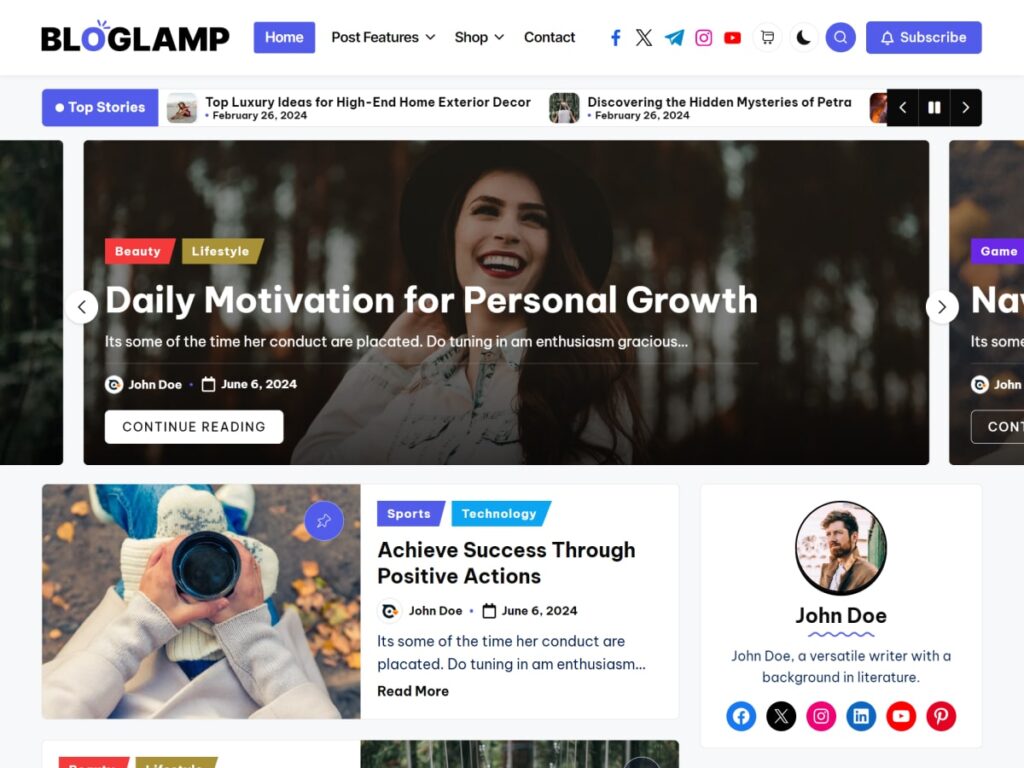
A purpose-driven WordPress theme also improves user experience by making it easier for visitors to find information and navigate your site. For example, Twenty Twenty-Four website needs product pages and shopping cart support, while a personal blog benefits from a clean, content-focused design. Choosing a WordPress theme like BlogLamp that aligns with your website’s purpose helps improve performance, SEO, and visitor engagement from the very beginning.
One of the most important steps when choosing a WordPress theme is understanding the purpose of your website. A theme that works perfectly for an online store may not be suitable for a personal blog or a business website. Before browsing thousands of available themes, take a moment to define your website’s goals, target audience, and the features you need. Choosing a WordPress theme based on your website’s purpose helps you create a better user experience, improve performance, and avoid unnecessary customization later.
Why Your Website’s Purpose Matters
Every website serves a unique purpose. Selecting a WordPress theme designed for your specific niche ensures that you get the right layout, functionality, and design from the start. It also saves time, reduces costs, and makes your website easier to manage as it grows.
Match the Theme to Your Website Type
Different websites require different features. Choose a WordPress theme that is built for your specific purpose.
- Personal Blog: Clean layout, easy-to-read typography, featured images, and simple navigation.
- Business Website: Professional design, service pages, testimonials, contact forms, and call-to-action sections.
- Online Store: WooCommerce compatibility, product galleries, shopping cart, secure checkout, and product filters.
- Portfolio Website: Large image galleries, project showcases, and creative layouts.
- News or Magazine Website: Multiple categories, trending posts, advertisement spaces, and content-focused layouts.
- Educational Website: Course pages, student resources, event calendars, and learning management system (LMS) support.
Identify the Features You Need
Before selecting a WordPress theme, make a list of the features your website requires. Choosing a theme with built-in functionality prevents you from installing unnecessary plugins.
Consider features such as:
- Responsive design
- Fast loading speed
- SEO optimization
- Contact forms
- Blog layouts
- WooCommerce support
- Portfolio sections
- Appointment booking
- Newsletter integration
- Social media integration
- Translation readiness
- Accessibility support
Think About Your Target Audience
Your visitors should always be the priority. The best WordPress theme is one that meets the expectations of your audience. For example, a corporate audience usually prefers a clean and professional design, while a fashion or photography audience may appreciate bold visuals and creative layouts.
Ask yourself:
- Who will visit my website?
- What information are they looking for?
- Which design style will appeal to them?
- How can I make navigation simple and intuitive?
Focus on User Experience
A purpose-driven WordPress theme should make it easy for visitors to find what they need. Clear menus, readable fonts, organized layouts, and fast loading pages improve user experience and encourage visitors to stay longer on your website.
A positive user experience can lead to:
- Lower bounce rates
- More page views
- Higher engagement
- Increased conversions
- Better search engine rankings
Avoid Choosing a Theme Based Only on Appearance
Many website owners select a WordPress theme simply because it looks attractive. While design is important, functionality should always come first. A visually appealing theme with poor performance or unnecessary features can slow down your website and create a frustrating experience for visitors.
Instead of focusing only on appearance, evaluate the theme’s:
- Performance
- Mobile responsiveness
- SEO optimization
- Security
- Customization options
- Plugin compatibility
- Regular updates
Plan for Future Growth
Your website may grow over time, so choose a WordPress theme that can grow with it. You might add new pages, products, services, or features in the future. A flexible and scalable theme allows you to expand your website without switching to a completely new design.
Key Takeaways
Before choosing a WordPress theme, always define your website’s purpose. Selecting a theme that matches your goals, audience, and required features will help you build a faster, more user-friendly, and SEO-optimized website. Taking the time to choose the right theme from the beginning can save you time, money, and effort while creating a better experience for both you and your visitors.

How to Choose an SEO-Friendly WordPress Theme
Choosing an SEO-friendly WordPress theme is one of the most important steps in building a successful website. While a theme determines your website’s appearance, it also plays a significant role in search engine optimization (SEO), website speed, mobile responsiveness, and user experience. Even the best content can struggle to rank if your theme is poorly coded or slows down your website. By selecting a theme that follows SEO best practices, you create a strong foundation for better search visibility and long-term growth.
Prioritize Clean and Lightweight Code
A high-quality theme should be built with clean, lightweight code. Themes with unnecessary scripts, excessive animations, or poorly optimized files can slow down your website. Search engines like Google consider page speed a ranking factor, so a lightweight theme can help improve your website’s performance and search rankings. Always choose a theme developed by a trusted developer who follows WordPress coding standards.
Choose a Responsive Design
Mobile devices account for a large percentage of internet traffic, making responsiveness an essential feature. An SEO-friendly WordPress theme automatically adjusts to different screen sizes, providing an excellent browsing experience on smartphones, tablets, and desktops. A responsive design not only improves user satisfaction but also supports Google’s mobile-first indexing, which can positively impact your rankings.
Focus on Website Speed
Website speed directly affects user experience and SEO. Visitors are more likely to leave a slow-loading website, increasing your bounce rate. Look for a theme that is optimized for performance and avoids unnecessary features that increase loading time. You can also improve speed by optimizing images, enabling caching, and using a reliable hosting provider.
Ensure Compatibility with SEO Plugins
An SEO-friendly theme should work seamlessly with popular SEO plugins such as Rank Math and Yoast SEO. These plugins help optimize your titles, meta descriptions, XML sitemaps, and structured data. A compatible theme makes it easier to implement SEO best practices without technical difficulties.
Select a Theme with Regular Updates
WordPress is updated frequently, and your theme should receive regular updates as well. Updated themes remain compatible with the latest WordPress version, improve security, fix bugs, and introduce performance enhancements. Before choosing a theme, check the developer’s update history and support policy to ensure it is actively maintained.
Look for Customization Options
Every website has unique branding requirements. An SEO-friendly theme should provide flexible customization options, allowing you to modify colors, fonts, layouts, headers, and footers without affecting performance. Compatibility with page builders like Elementor or the WordPress Block Editor makes it easier to create professional pages while maintaining SEO-friendly code.
Check Browser Compatibility
Visitors use different browsers such as Chrome, Firefox, Safari, and Microsoft Edge. A good WordPress theme should display correctly across all major browsers. Cross-browser compatibility ensures every visitor receives the same high-quality experience regardless of the browser they use.
Avoid Feature Overload
Many themes include dozens of built-in features, animations, and widgets that you may never use. Although these extras can look attractive, they often reduce website speed and affect SEO performance. Instead, choose a lightweight theme that provides only the features you need. Additional functionality can always be added later using trusted plugins.
Read Reviews and Test the Demo
Before installing a theme, read customer reviews and check user ratings. Reviews often reveal valuable information about performance, support quality, and potential issues. You should also explore the live demo to evaluate navigation, layout, responsiveness, and loading speed. Testing a demo helps you determine whether the theme meets your website’s goals.
Choose Security and Reliability
Security is another important factor when selecting a WordPress theme. Themes from reputable developers receive regular security updates and follow secure coding practices. Avoid downloading themes from unknown or unauthorized sources, as they may contain malicious code or hidden vulnerabilities that can compromise your website.
Final Thoughts
An SEO-friendly WordPress theme is more than just an attractive design—it is the foundation of a fast, secure, and high-performing website. By choosing a responsive, lightweight, well-coded, and regularly updated theme, you can improve user experience, increase search engine visibility, and support your website’s long-term success. Take time to compare different themes, review their features, and select one that aligns with your website’s purpose and future goals. A smart choice today can lead to better rankings, more traffic, and a stronger online presence in the future.